Print without cutting anything off
Choose a layout, check the preview, and print at full size.
Steps
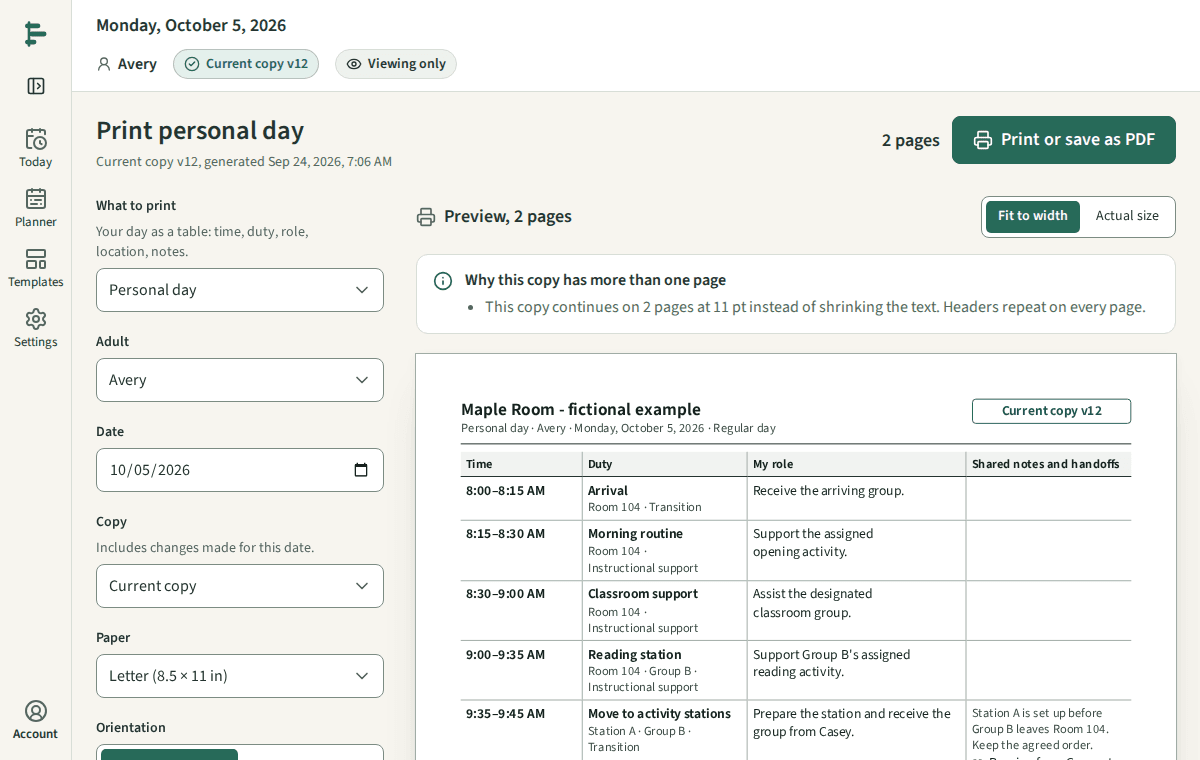
Open Print from Today or the Planner. Choose what to print: your day, your week, a classroom team board, pocket cards, or a substitute handoff.
Choose the date, the paper, and what to include. The preview shows the real pages; a long day continues on the next page or card instead of being cut off.
Choose Print or save as PDF. In your browser's print dialog, keep the scale at 100%, not Fit to page.
For pocket cards, print one card first and check it in your holder before printing the rest.
Good to know
- Every printout shows its date, its copy version, and when it was made. A printed copy does not update, so compare its version with the current copy before you use it.
- Low ink keeps the meaning in words and outlines, so grayscale copies stay readable.